
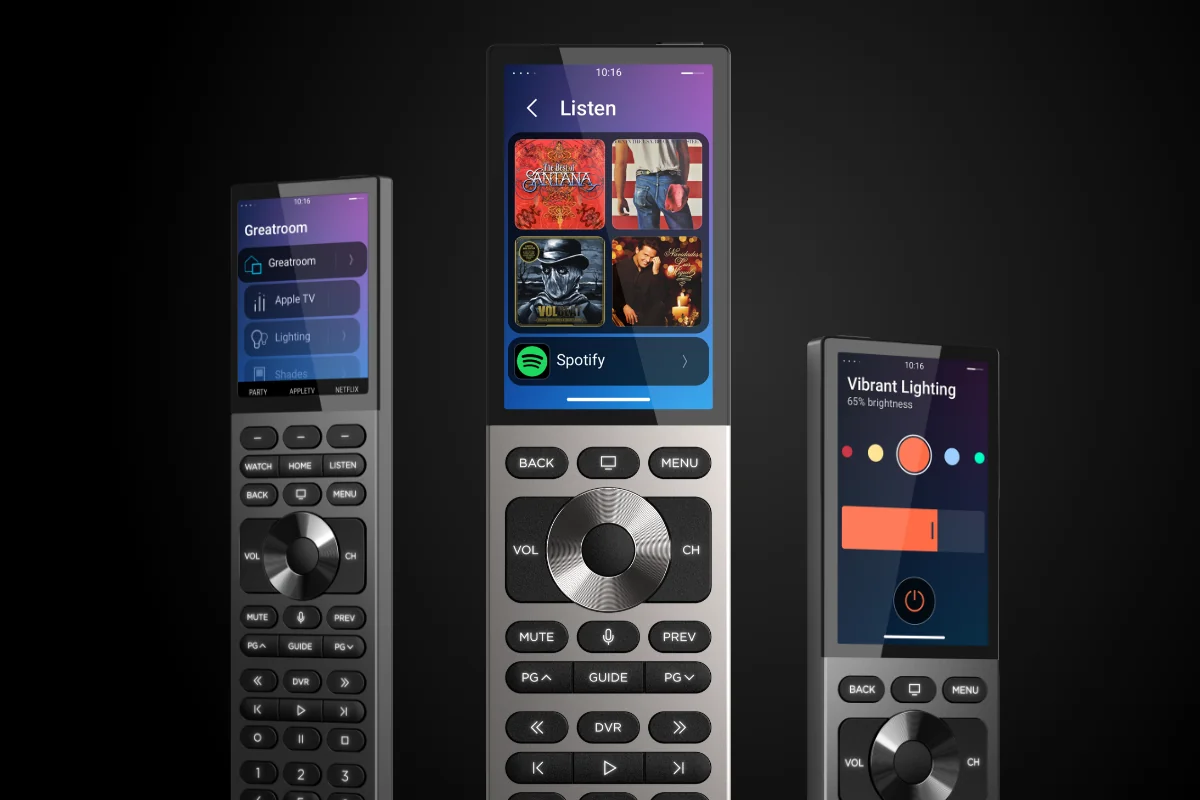
The remote control is the most intimate touchpoint between you and your smart home. It is the device you reach for every evening, the device your family uses daily, the device that guests encounter first. The Control4 Halo remote was designed with this understanding — and it represents a generational leap in how we interact with intelligent homes. At MK Iconic Solutions, having deployed Halo across dozens of client installations, we can confirm that it lives up to its billing as the finest smart home remote ever made.
Refined Industrial Design: Two Variants
Halo is available in two variants, each serving a different preference. The standard Halo features a 2.8-inch colour LCD display and a complete set of backlit hard buttons — designed for intuitive, single-handed operation in the dark. Its form factor is comfortable to hold, weighted to feel substantial without being heavy, and contoured to sit naturally in either hand. The button layout has been refined through extensive user testing to place the most frequently used controls where fingers naturally rest.
The Halo Touch adds a 3.2-inch touchscreen and a brushed aluminium chassis in black or silver, bringing a premium aesthetic that complements the most refined interiors. The touchscreen provides direct access to media browsing, room navigation, and system status — augmenting the physical buttons with visual context. Both variants share the same internal architecture, WiFi connectivity, and voice control capabilities. The choice between them is purely one of interaction preference: tactile versus visual, or — as many of our clients discover — one of each for different rooms.
One Remote to Replace Them All
Halo replaces every remote in your home. Television, streaming devices, audio systems, Blu-ray players, lighting, shading, climate — all controlled from a single device. Browse media libraries on the colour display. Adjust lighting scenes with dedicated buttons. Launch automation sequences with customisable shortcuts. The drawer full of remotes — each controlling a single device, each with its own logic, each misplaced at the worst possible moment — becomes a thing of the past.
This consolidation is more than a convenience — it fundamentally changes the usability of the home. Guests no longer need a tutorial to watch television. Children can operate the cinema room without calling for help. Every control is accessible from one device, and the interface is consistent regardless of which room you are in or which device you are controlling. The cognitive load of managing multiple interfaces drops to near zero, replaced by the intuitive simplicity that is the hallmark of great design.
How Does Halo Voice Control Work?
Halo introduces an innovative voice button that dynamically adapts to context. When you are using Apple TV, the voice button activates Siri — allowing you to search for content, control playback, and navigate the Apple TV interface using natural language. When watching cable through an Xfinity box, it activates the Xfinity voice assistant for channel navigation and search. This dual-assistant capability is unique to Halo and eliminates the need for separate remotes entirely.
Beyond platform-specific voice control, Halo supports full Control4 voice commands for system-wide automation. "Turn off the lights" dims the room. "Play jazz in the kitchen" activates the kitchen audio zone with your preferred streaming service. "Set the temperature to 21" adjusts the nearest thermostat. These commands are processed locally through Control4's voice engine, ensuring fast response times regardless of internet connectivity — a critical distinction from cloud-dependent voice assistants that become useless when the broadband drops.
Backlit for Life in the Dark
Every button on the Halo remote is backlit with warm white LEDs. Pick it up in a pitch-dark cinema room and every control is immediately visible and accessible. The backlighting activates on pickup — an accelerometer detects when the remote is lifted — and fades after a configurable timeout to avoid being a distraction during viewing. The illumination level is carefully calibrated: bright enough to identify every button, dim enough to avoid drawing attention in a darkened room.
Three customisable buttons with digital labels — displayed on the LCD screen adjacent to the buttons — allow one-touch access to your most-used scenes or devices. These labels update dynamically, so a button labelled "Movie Night" in the living room might display "Music" in the kitchen and "Bedtime" in the master bedroom. A colour shortcut system accessible from the top of the remote provides access to additional functions without adding physical buttons, keeping the remote's form factor clean and uncluttered.
WiFi That Reaches: Dual-Band Connectivity
Halo supports both 2.4GHz and 5GHz WiFi with an advanced antenna array delivering up to five times stronger signal than its predecessors. Drop-outs and lag are eliminated. The remote responds instantly, every time, from anywhere in the home — including outdoor areas within WiFi range. The dual-band support ensures reliable connectivity in environments with heavy 2.4GHz congestion (common in urban areas with many neighbouring networks) by seamlessly transitioning to the cleaner 5GHz band.
The improved WiFi range also enables remote operation from adjacent rooms. Starting the cinema from the kitchen while dinner finishes, or adjusting the bedroom lighting from the bathroom, becomes effortless. The remote's connection is maintained continuously, so there is no wake-up delay or reconnection pause — the moment you press a button, the command is transmitted and executed.
Battery Life and Charging
Halo's rechargeable lithium-ion battery delivers approximately five to seven days of typical use between charges — and a full recharge takes approximately two hours via the included USB-C charging cradle. The cradle is designed as a display stand, allowing the remote to sit upright on a side table while charging, always visible and accessible. Low-battery notifications appear on the LCD screen well before the battery is depleted, ensuring you are never caught without power.
For clients with multiple Halo remotes — and many of our installations include one per primary room — each charging cradle serves as a dedicated home for the remote when not in hand. This solves the perennial problem of misplaced remotes: the cradle provides both a charging function and a consistent location. Combined with Control4's "Find My Remote" feature — which causes the Halo to emit an audible tone when triggered from the app — the days of lost remotes are comprehensively over.
Is the Control4 Halo the Best Smart Home Remote?
Having deployed Halo across dozens of client homes over the past year, the feedback is unanimous: it is the best smart home remote ever made. It combines the tactile satisfaction of physical buttons with the visual richness of a modern display, wrapped in a design that looks and feels like a premium product worthy of the homes it inhabits. The dual voice assistant integration, the dynamic customisation, the backlit buttons, and the reliable WiFi connectivity combine to create a device that eliminates friction from every interaction with your home.
For our clients, Halo is not just a remote — it is the gateway to their entire home experience. It is the device that makes the investment in automation tangible, the device that delights guests, and the device that family members reach for instinctively. In our view, no other remote control in the smart home industry comes close. If you are considering a Control4 system, or if you have an existing system that predates Halo, contact us to discuss an upgrade — the improvement to your daily experience will be immediate and lasting.